Stay with the page you are reading
Reader opens beside an ordinary webpage. Move over a word to see it in context, switch between the word and its sentence, and open a dictionary or translation when you need one. You can explore without signing in.
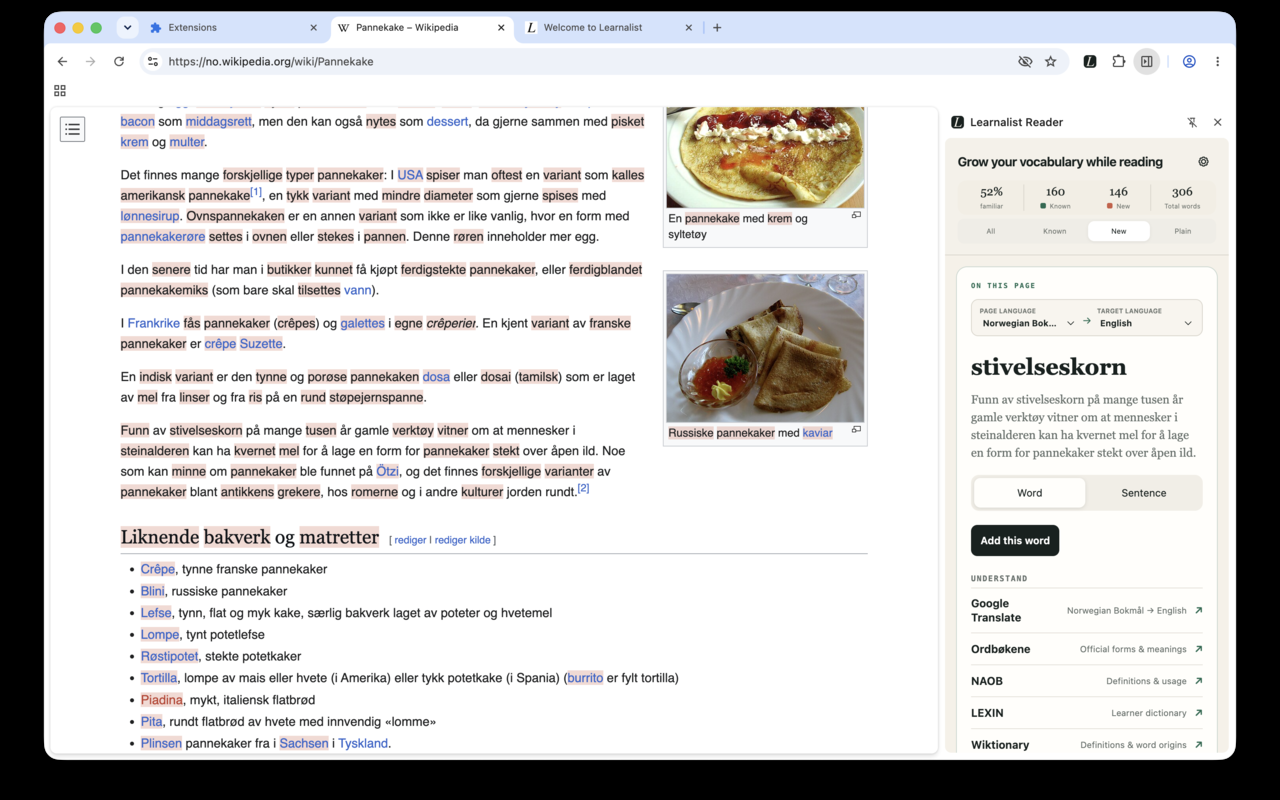
From reading to remembering
Watch the 1-minute walkthrough on YouTube to see how to translate a word, understand its sentence, and save both to Learnalist.
Make the page yours
Choose the page and target languages. If you connect Learnalist, Reader can show which visible words are already in your library and help you spot new ones. The All, Known, New, and Plain filters let you decide how much marking appears on the page.
Reader processes the page locally as you read. Page content is not sent to Learnalist automatically; saving a learning note is your choice. See the Privacy Policy for details.
Where Reader works
Reader is designed for ordinary webpages. It does not currently work inside Google Docs or browser-provided reading modes. Some sites with unusual page layouts or changing content may behave differently.
If a page does not work as expected, tell us about it. The page URL and a short description are enough; HTML details are optional.
Grow your vocabulary while reading
Follow the written word-to-note walkthrough, or start with how to choose vocabulary worth keeping. Our reading guides connect the browser workflow to understanding and later practice.
Add Learnalist Reader to your desktop browser and explore the language you meet on the web.
Requires Chrome or Firefox on desktop.
Reader is a desktop extension. See how Reader works, then install it in your desktop browser.